

If you are self-employed or run an SME, you are probably already familiar with the model 303, the form used to declare the Quarterly VAT. But did you know that many freelancers and companies end up paying more for small mistakes? In this article learn how to fill out form 303 without paying more. Today is the last day to submit it, and in this quick guide we will help you with a step by step tutorial to avoid these common mistakes and take advantage of all the VAT deductions possible.
What exactly is model 303?
He model 303 is the quarterly declaration of Value Added Tax (VAT), which includes both the output VAT (the one you charge to your clients) and the input VAT (the one you pay on your professional expenses). The difference between the two is the amount you must deposit or the amount that the Treasury will return to you.
Step-by-step tutorial to correctly fill out form 303. Learn how to fill out form 303 without paying more
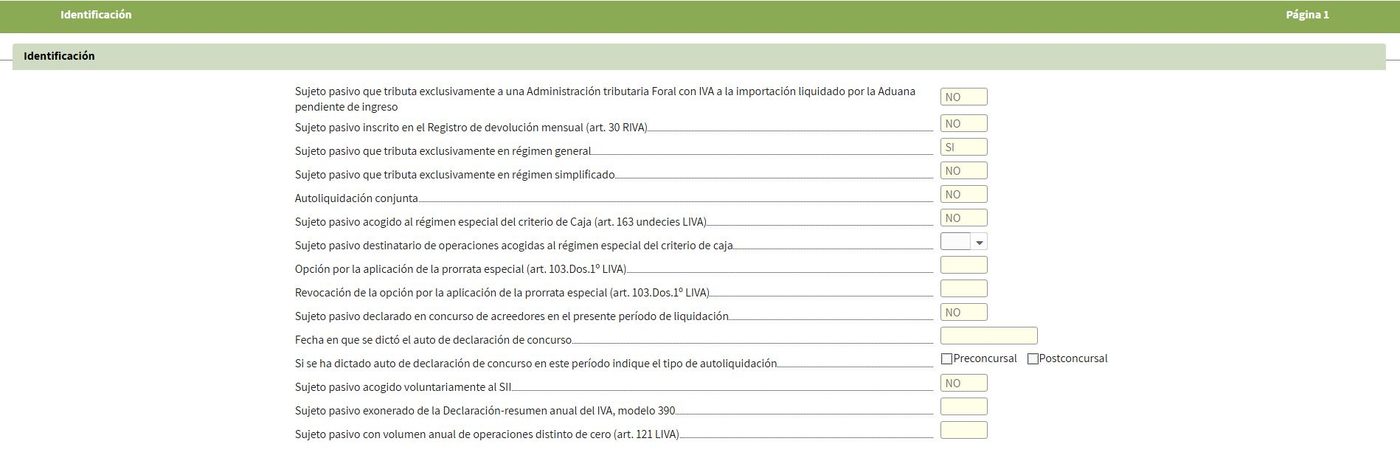
Step 1: Identification and fiscal year
Start by correctly completing the personal and tax information: NIF, name, year and corresponding quarter. Although it seems obvious, this is where the first errors arise, especially when presenting old saved forms.
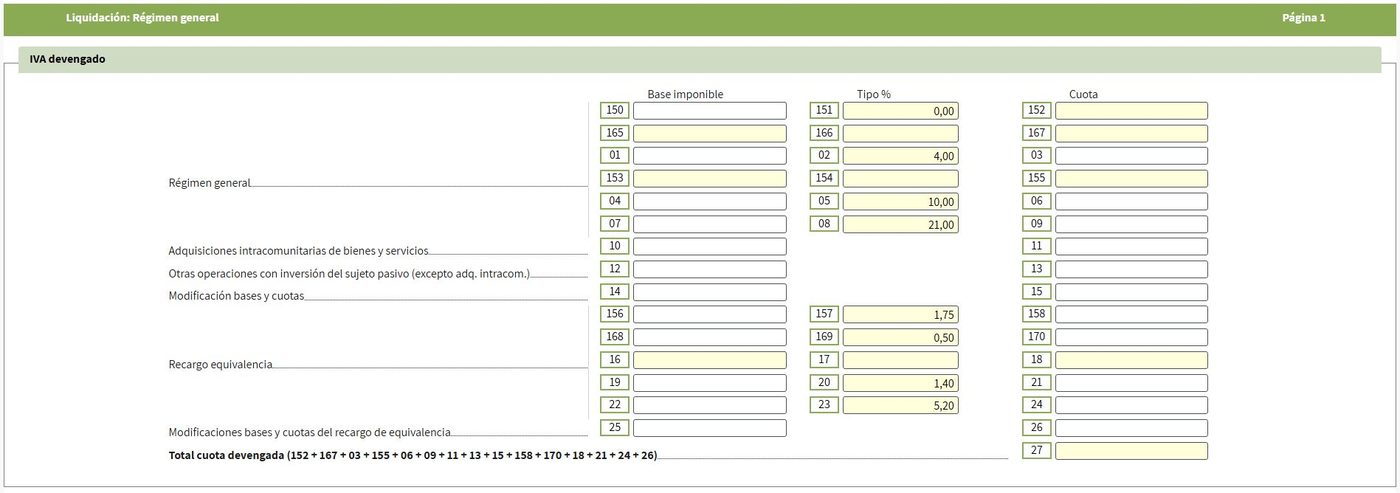
Step 2: VAT accrued (what you charge)
Here you must reflect all the VAT charged on your invoices issued during the quarter. The most common mistake is forgetting to include an invoice issued just at the end of the period or including invoices that actually correspond to another quarter. Check the issue date carefully.
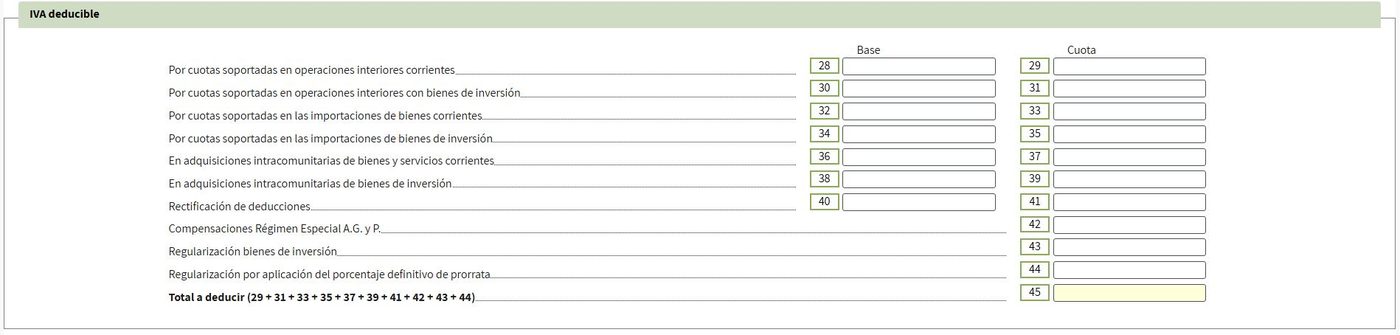
Step 3: Deductible VAT (what you pay)
This section is crucial, because the famous deductions appear here. Here’s where you can really “save” on your return:
- Usual deductible expenses:
- Telephone and internet, as long as they are used for your activity.
- Office supplies and supplies (paper, ink, software).
- Rental of offices or commercial premises.
- Professional vehicle (only if it is 100% affected by the activity).
For example, if you have invoices for materials or rental of the premises, make sure to include the input VAT clearly in the corresponding section of the model.
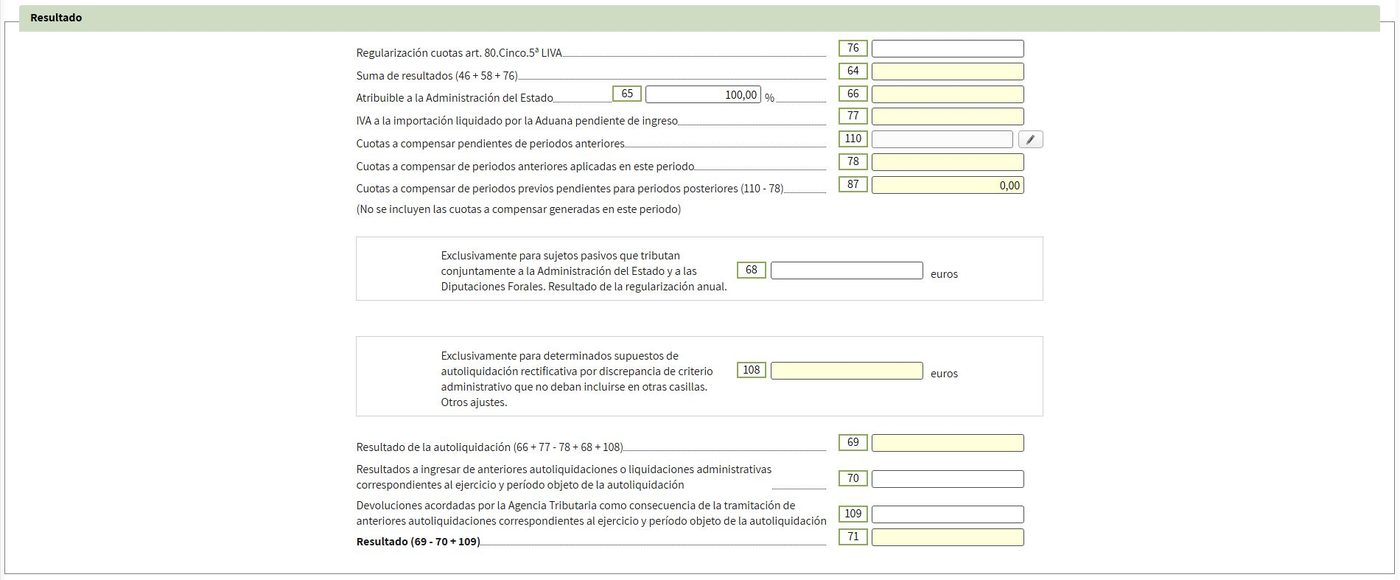
Step 4: Result and compensation
The result for the quarter will automatically appear here. If it comes back to you, remember that you can compensate it in the next period. Many freelancers forget this option and request an immediate refund, which could delay the process.
What are the most common errors when submitting form 303?
- Forgotten invoices: Failure to record any invoice issued or received may generate a mismatch and possible sanctions.
- Non-deductible expenses: include personal expenses or expenses not strictly related to the activity.
- Miscalculated VAT: errors in applied percentages, especially in sectors with different tax rates.
Frequently asked questions (FAQ)
What happens if I file form 303 late?
If you submit it after the deadline, the Treasury will apply an automatic surcharge that may increase depending on the delay.
Can I modify form 303 after submitting it?
Yes, you can submit a complementary or corrective declaration, but do it as soon as possible to avoid penalties.
How can I check if an invoice is deductible?
It must be directly related to your professional activity, have all your tax information and comply with formal requirements.
Conclusion: avoid paying more than necessary, learn how to fill out form 303 without paying more.
Correctly present your model 303 Not only does it avoid penalties, but it also ensures that you do not overpay, optimizing all your possible deductions. If you still have doubts or need help to correctly manage your quarterly VAT, don’t wait any longer.
Book a free session with our advice and clarify all your doubts with professionals who are experts in taxation for the self-employed and SMEs.
You can obtain more information on the website of the Tax Agency